What you can animate with Python for your physics learning
Here is the video to the is script here
You want to see more?
How to Run This Simulation
To get the Stoppenberg (is the name of a quarter of the town in Essen here in the West-Germany – we have a lot of hills here) Physics Sim running on your local machine, follow these three simple steps:
1. Install the Prerequisites
First, ensure you have Python installed. Then, open your terminal (Fedora) or Command Prompt (Windows) and install the required libraries using pip:
Bash
pip install pygame mariadb
Note for Windows users: If you want the automatic service check to work, also install:
Bash
pip install pywin32
2. Set Up Your Database
The script expects a MariaDB database named laufen with a table to store the results. Run the following SQL command in your MariaDB console (you should create a database before):
Open your installed MariaDB database with
mysql -u <your username> – p
enter the password of your username.
CREATE DATABASE IF NOT EXISTS laufen;
USE laufen;
SQL
CREATE DATABASE laufen;
USE laufen;
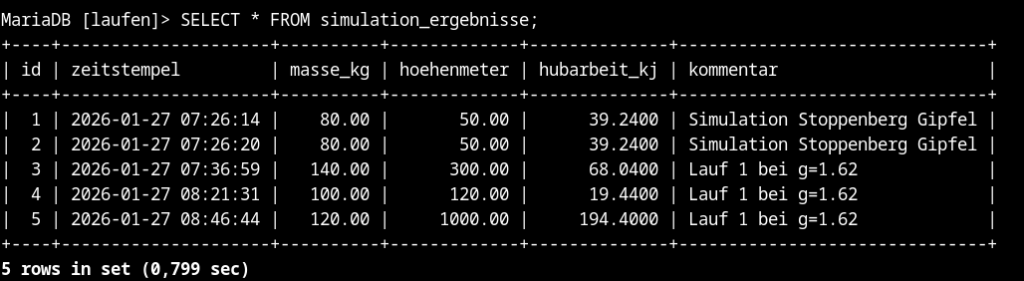
CREATE TABLE simulation_ergebnisse (
id INT AUTO_INCREMENT PRIMARY KEY,
zeitstempel DATETIME DEFAULT CURRENT_TIMESTAMP,
masse_kg DECIMAL(5,2),
hoehenmeter DECIMAL(6,2),
hubarbeit_kj DECIMAL(10,4),
kommentar VARCHAR(255)
);
Here is a screenshot of the database
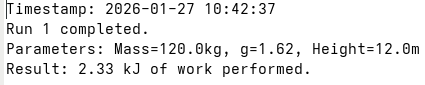
Here is a screenshot of the log file
The script
import pygame
import sys
import mariadb
import getpass
from datetime import datetime
from pathlib import Path
import subprocess
import platform
import warnings

# Suppress unnecessary deprecation warnings in the console
warnings.filterwarnings("ignore", category=DeprecationWarning)

# --- 0. SECURITY & PATH CONFIGURATION ---
db_password = getpass.getpass("Enter MariaDB password for user 'sven': ")
filename_input = input("Enter name for backup text files (e.g., sim_data.txt): ")
folder_input = input("Enter folder name for backups (e.g., simulations): ")

# Create path safely using Pathlib
home_dir = Path.home()
target_folder = home_dir / folder_input
target_folder.mkdir(parents=True, exist_ok=True)

# --- 1. INPUT HELPER ---
def get_valid_input(prompt, allow_zero=False):
    while True:
        try:
            value = float(input(prompt))
            if allow_zero and value >= 0: return value
            if value > 0: return value
            print("Error: Please enter a positive number.")
        except ValueError:
            print("Error: Invalid input. Use numbers (use a dot for decimals).")

# --- 2. PARAMETER INPUT ---
print("\n--- Physics Simulation Parameters ---")
runs_total = int(get_valid_input("How many runs should be simulated?: "))
mass = get_valid_input("Mass of the runner (kg): ")
g = get_valid_input("Gravity (e.g., 9.81 for Earth, 1.62 for Moon): ")
max_height = get_valid_input("Height of the incline (m): ")

runs_counter = 0

# --- 3. CROSS-PLATFORM SERVICE CHECK ---
print("\nDetecting OS and checking MariaDB status...")
system_os = platform.system()

if system_os == "Linux":
    try:
        result = subprocess.run(
            ['systemctl', 'is-active', 'mariadb.service'],
            capture_output=True, text=True
        )
        status = result.stdout.strip()
        print(f"Linux detected. MariaDB Status: {status}")
        if status != "active":
            print("Warning: MariaDB service might not be running!")
    except Exception as e:
        print(f"Linux check failed: {e}")

elif system_os == "Windows":
    try:
        # Lazy import to prevent errors on Linux systems
        import win32serviceutil
        status = win32serviceutil.QueryServiceStatus('MariaDB')[1]
        if status == 4: # 4 corresponds to 'Running'
            print("Windows detected. MariaDB service is running.")
        else:
            print("Windows detected. MariaDB service is NOT started.")
    except ImportError:
        print("Note: 'pywin32' not installed. Skipping Windows service check.")
    except Exception as e:
        print(f"Windows check failed: {e}")

# --- 4. DATABASE CONNECTION ---
try:
    conn = mariadb.connect(
        user="sven",
        password=db_password,
        host="127.0.0.1",
        database="laufen"
    )
    cursor = conn.cursor()
    print("Database connection established.")
except mariadb.Error as e:
    print(f"Database error: {e}")
    sys.exit(1)

# --- 5. PYGAME SETUP ---
pygame.init()
width, height = 800, 400
screen = pygame.display.set_mode((width, height))
pygame.display.set_caption("Physics Sim Pro - Multi-Run & DB Logging")
font = pygame.font.SysFont("Arial", 20)

# Coordinates for the incline (Point A to Point B)
A, B = (50, 350), (750, 100)
x_pos = A[0]
speed = 3.0

# --- 6. MAIN LOOP ---
while runs_counter < runs_total:
    for event in pygame.event.get():
        if event.type == pygame.QUIT:
            conn.close()
            pygame.quit()
            sys.exit()

    screen.fill((255, 255, 255))
    pygame.draw.line(screen, (0,0,0), A, B, 3)

    # Calculate position and physics
    progress = (x_pos - A[0]) / (B[0] - A[0])
    y_pos = A[1] + progress * (B[1] - A[1])
    current_height = progress * max_height
    work_kj = (mass * g * current_height) / 1000

    # Display HUD
    screen.blit(font.render(f"Run: {runs_counter + 1} / {runs_total}", True, (0,0,0)), (50, 20))
    screen.blit(font.render(f"Gravity: {g} m/s²", True, (0,0,0)), (50, 50))
    screen.blit(font.render(f"Work: {work_kj:.2f} kJ", True, (200,0,0)), (50, 80))

    # Draw character
    pygame.draw.circle(screen, (0, 102, 204), (int(x_pos), int(y_pos) - 50), 10) # Head
    pygame.draw.line(screen, (0, 102, 204), (x_pos, y_pos - 40), (x_pos, y_pos), 2) # Body

    x_pos += speed

    # Goal reached logic
    if x_pos >= B[0]:
        final_work = (mass * g * max_height) / 1000

        # A) Save to MariaDB
        try:
            comment = f"Run {runs_counter+1} at g={g}"
            sql = "INSERT INTO simulation_ergebnisse (masse_kg, hoehenmeter, hubarbeit_kj, kommentar) VALUES (%s, %s, %s, %s)"
            cursor.execute(sql, (mass, max_height, final_work, comment))
            conn.commit()
            print(f"Run {runs_counter+1} saved to Database.")
        except mariadb.Error as e:
            print(f"Database insertion error: {e}")

        # B) Create Local Backup Log
        runs_counter += 1
        time_name = datetime.now().strftime("%Y-%m-%d_%H-%M-%S")
        time_content = datetime.now().strftime("%Y-%m-%d %H:%M:%S")

        file_path = target_folder / f"{time_name}_{filename_input}"

        with open(file_path, "w") as f:
            f.write(f"Timestamp: {time_content}\n")
            f.write(f"Run {runs_counter} completed.\n")
            f.write(f"Parameters: Mass={mass}kg, g={g}, Height={max_height}m\n")
            f.write(f"Result: {final_work:.2f} kJ of work performed.\n")

        print(f"Backup file created: {file_path.name}")
        x_pos = A[0] # Reset to start

    pygame.display.flip()
    pygame.time.Clock().tick(60)

# Cleanup
print(f"\nSimulation successfully finished. {runs_counter} runs logged.")
conn.close()
pygame.quit()
This article first appeared on my substack [Link].