Read out the Gas level from a CSV file with Python Pandas
The fill level of Germany’s gas storage facilities is currently very low. Too low for the situation at the end of January 2026. These levels were actually expected to be reached by the end of March.
Unfortunately, the German government’s website is very slow to update the fill levels of our gas storage facilities, even though they should be updated daily. I suspect the fax machines are malfunctioning again, or too many errors are being made between the tablet and the paper.
An anecdote: I know someone who works in the city administration of Bogotá in Colombia. She said, „Fax machines are outdated; they’re no longer used there.“
There’s another website, Gas Infrastructure Europe, which reports on the situation across Europe. This CSV file is structured differently than the German government’s, but it’s also easy to read. It just takes a bit longer to understand the logic.
What kind of gas will be storage in the gas container?
Methane is usually stored. Methane, also known as methyl hydrogen, carbane*, or R-50, belongs to the alkanes, the simplest hydrocarbons. Its chemical formula is CH4, which is a carbon atom surrounded by four hydrogen atoms. That’s how it’s often depicted. Whether it actually looks like that in reality, I think nobody really knows.
carbane: There is a hint about this name. The following text is from Wikipedia:
General Principles, Rules, and Conventions“. Nomenclature of Organic Chemistry. IUPAC Recommendations and Preferred Names 2013 (Blue Book). Cambridge: The Royal Society of Chemistry. 2014. P-12.1. doi:10.1039/9781849733069-00001. ISBN 978-0-85404-182-4. Methane is a retained name (see P-12.3) that is preferred to the systematic name ‚carbane‘, a name never recommended to replace methane, but used to derive the names ‚carbene‘ and ‚carbyne‘ for the radicals H2C2• and HC3•, respectively.

These modules you need to use
To install the data analysis library, use the command: pip install pandas. This assumes, of course, that you have already installed Python if you are using Windows or Mac. In most Linux distributions, Python is included with the operating system installation.
Otherwise, this script, which is optional but simplifies things, uses the internal Pathlib module.
The file is originally named AGSI_CountryAggregatedDataset_gasDayStart-<date>.csv by Gas Infrastructure Europe. However, I renamed it to csv_export.csv because it’s easier for me to use. I don’t mind how you name the file.
What does the script do?
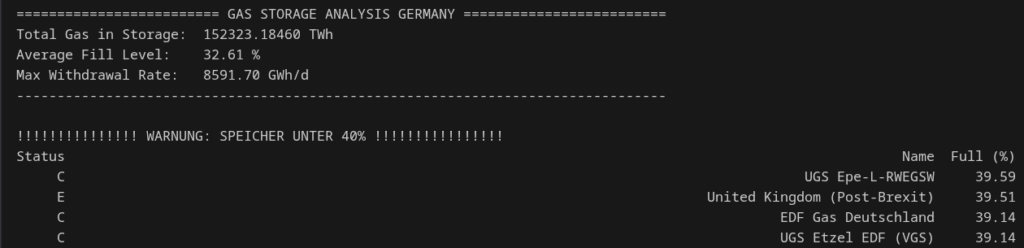
The script reads the total gas volume, the average fill level, and the maximum withdrawal rate.
The main part of the process involves reading all storage levels that have dropped below 40%, sorted from highest to lowest. This means it starts with the CSV file at 39.59% and logically ends at 0.00%.
Screenshot of the script
The Python Pandas script
import pandas as pd
from pathlib import Path

# Path setup
home = Path.home()
REL_PATH = "Linux_PC/Programmieren/Python/Python_eigene_Scripte/fuellstand_gas_deutschland/csv_export.csv"
file_path = home / REL_PATH


# 1. Load data
# Note: If decimals in the CSV use commas (e.g., 90,5), add decimal=","
df = pd.read_csv(file_path, sep=";")

# 2. Styling Header
print(f"\n{' GAS STORAGE ANALYSIS GERMANY '.center(80, '=')}")

# 3. Quick Statistics
# We use the exact column names you provided
avg_fill = df['Full (%)'].mean()
total_gas = df['Gas in storage (TWh)'].sum()
max_withdrawal = df['Withdrawal (GWh/d)'].max()

print(f"Total Gas in Storage:  {total_gas:.5f} TWh")
print(f"Average Fill Level:    {avg_fill:.2f} %")
print(f"Max Withdrawal Rate:   {max_withdrawal:.2f} GWh/d")
print("-" * 80)

# 4. Display the top 5 entries
kritische_speicher = df[df['Full (%)'] < 40].sort_values(by='Full (%)', ascending=False)[['Status', 'Name', 'Full (%)']]

print(f"\n{' WARNUNG: SPEICHER UNTER 40% '.center(60, '!')}")

if not kritische_speicher.empty:
    print(kritische_speicher.to_string(index=False))
else:
    print("Alle Speicher sind aktuell über 40%.")

print("!" * 60 + "\n")