Python / MongoDB: How to check your wrong fields names
I have created serveral databases about different countries. It is a manually process what I do and for this reason there is mistake normal. Every human makes mistakes. This we cannot discuss away. Everybody have to admit it.
The problem with MongoDB with field names
The first problem is that MongoDB stores the information in a document and not a tables. For this reason it belongs to the databases that uses NoSQL.
Every field name is new for MongoDB
The problem is, that I use MongoDB. This database has not a problem with different field names. The SQL-databases like MariaDB or MySQL or other have stern field names. In MongoDB there is no internal checking process for field names.
In MongoDB you can use one field name like: „water“ but if you make a mistake and you cannot remember what did you write in the past you use the word „waters“ and now you have a new field name.
The installation of PyMongo
For this reason we can check it with a little Python script with the library Pymongo. Pymongo you must install on your system.
Go to your terminal, type in the commnd pip install pymongo.
You can use PyMongo if you have installed Python before
Ok, this works if you have already installed Python on your system. In Linux distribution Python is inclued during the first installation process but on Windows or Mac you must install Python first.
The next steps of creating the script
Now we want to create a script, a little programm, that should check all field names, what you have added to the collection.
I use here the Juypter Lap the successor of the Jupyter Notebook. The Juypter Notebook you can install for example via some python commands, too.
But you can use a lot of other editors what you like. The only condition is that you must save it with the extension .py.
The Python script with PyMongo
from pymongo import MongoClient
from collections import Counter

client = MongoClient()
col = client["Nederland"]["gemeente"]

key_counts = Counter()
for doc in col.find().sort({"_id":1}):
    key_counts.update(doc.keys())

for key, count in key_counts.most_common():
    print(f"{key:20} -> {count}")
This output you can see now all entries what you typed in MongoDB for this collection. But it is difficult to check if something wrong.
A new try with other commands
from pymongo import MongoClient
from collections import Counter
client = MongoClient()
col = client[„Nederland“][„gemeente“]
key_counts = Counter()
for doc in col.find().sort({„_id“: 1}):
key_counts.update(doc.keys())
for key, count in sorted(key_counts.items()):
print(f“{key:20} -> {count}“)
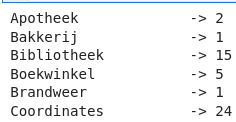
Now you see all fields one below the other.