New MongoDB version on my computer
This morning I got updates on my AlmaLinux 9.8 on my Lenovo notebook (computer).
I get the updates with an Update-Script where it checks everything.
The Update script
#!/bin/bash

clear

# Variablen korrekt definieren
BOOT_FOLDER="/boot"
# df -m gibt Werte in Megabyte aus
BOOT_FOLDER_SIZE=$(df -m /boot | awk 'NR==2 {print $2}')
BOOT_FOLDER_FREE=$(df -m /boot | awk 'NR==2 {print $4}')

#connecting to the own wifi at home
echo "Connecting to the Wifi at home"

#sudo nmcli dev wifi connect 74:42:7F:9D:B9:F5

sleep 2


echo "-------------------------"

b=$(echo "${LOGNAME^}")

a=$(date +"%H")

c=$(date +"%T")

if [ "$a" -ge 6 ] && [ "$a" -lt 12 ]; then
    echo "Guten Morgen" $b "Es ist" $c
elif [ "$a" -ge 12 ] && [ "$a" -lt 18 ]; then
    echo "Guten Tag" $b "Es ist" $c
elif [ "$a" -ge 18 ] && [ "$a" -lt 20 ]; then
    echo "Guten Abend" $b "Es ist" $c
else
    echo "Gute Nacht" $b "Es ist" $c
fi
echo
echo

df -h | awk  '{print $1, $2}'


echo "------------------------"
echo

#checking whether MariaDB is active
echo "Checking the status of MariaDB"
echo

if systemctl status mariadb.service | grep -q "active (running)"; then
	echo "MariaDB läuft"
else
	echo "MariaDB läuft nicht"
fi
echo


echo "Checking the status of MongoDB"
echo

if systemctl status mongod | grep -q "active (running)"; then
	echo "MongoDB läuft"
else
	echo "MongoDB läuft nicht"
fi
echo

# Ausgabe der Größen
echo "Ordner $BOOT_FOLDER ist ${BOOT_FOLDER_SIZE}MB groß und hat noch ${BOOT_FOLDER_FREE}MB frei."

# Logik-Check: Warnung bei weniger als 150MB
if [ "$BOOT_FOLDER_FREE" -lt 150 ]; then
    echo "⚠️ Warnung: Zu wenig Platz auf /boot ($BOOT_FOLDER_FREE MB). Bitte aufräumen!"
    echo "Tipp: Nutze folgenden Befehl zum Aufräumen:"
    echo "sudo dnf remove \$(dnf repoquery --installonly --latest-limit=-2 -q)"
else
    echo "✅ Speicherplatz auf /boot ist ausreichend."
fi

#checking to updates

echo ----------------------------
echo "checking for updates for the operating system"

dnf upgrade -y --refresh

echo ----------------------------

#deleting the dnf cache
echo "Delete the dnf cache"

dnf clean packages
dnf clean metadata
dnf clean dbcache

echo -----------------------------
echo
echo "Last boots"
last -n 8
echo "---------------------------"
echo
echo "Es ist die $SHELL geladen."
echo "Loginname lautet: $LOGNAME"
echo "Zeichensatz lautet: $LANG"
echo "Bashversion: $BASH_VERSION"
echo
echo "--------------------------"

echo "Journal older than 1 day"
journalctl --vacuum-time=1d


# checking the /tmp folder size (Kann wegen systemd-tmpfiles-clean entfernt werden, aber der Check schadet nicht)
    TMP_SIZE_KB=$(du -sk /tmp/ | awk '{print $1}')
    THRESHOLD_KB=400 # 400 KB

    echo "Prüfung /tmp Ordnergröße"

    if (( TMP_SIZE_KB > THRESHOLD_KB )); then
            echo "⚠️ attention: The folder  /tmp bigger than $THRESHOLD_KB KB. current size $TMP_SIZE_KB KB"
    else
            echo "✅ The size /tmp less than $THRESHOLD_KB KB. current size $TMP_SIZE_KB KB"
    fi


    echo "---------------------------------------------"

    # DNF Cache Größe überprüfen
    ORDNER_DNF="/var/cache/dnf"
    SIZE_MB_DNF=$(du -sm "$ORDNER_DNF" | cut -f1)
    LIMIT_MB_DNF=1024 # 1 GB

    echo "Checking dnf size"
    echo "current dnf size: $(du -sh "$ORDNER_DNF" | cut -f1)"

    if [ "$SIZE_MB_DNF" -gt "$LIMIT_MB_DNF" ]; then
            echo "attention: The folder '$ORDNER_DNF' bigger than 1 GB."
    else
            echo "✅️ The folder '$ORDNER_DNF' less than 1 GB."
    fi

    echo


    echo "---------------------------------------------"

    # /var/log size checking
    ORDNER_LOG="/var/log"
    SIZE_MB_LOG=$(du -sm "$ORDNER_LOG" | cut -f1)
    LIMIT_MB_LOG=1024 # 1 GB

    echo "checking size /var/log"
    echo "current size /var/log $(du -sh "$ORDNER_LOG" | cut -f1)"

    if [ "$SIZE_MB_LOG" -gt "$LIMIT_MB_LOG" ]; then
            echo "Attention the folder '$ORDNER_LOG' bigger than 1 GB."
    else
            echo "✅ The folder '$ORDNER_LOG' less than 1 GB."
    fi
    echo

    echo "----------------------------------------------"
    echo
I start this script via Bash menu that I have written:
The shut down script
#!/bin/bash
clear

a=$(date +"%H")

c=$(date +"%T")

if [ "$a" -ge 6 ] && [ "$a" -lt 12 ]; then
    echo "Guten Morgen" $b "Es ist" $c
elif [ "$a" -ge 12 ] && [ "$a" -lt 18 ]; then
    echo "Guten Tag" $b "Es ist" $c
elif [ "$a" -ge 18 ] && [ "$a" -lt 20 ]; then
    echo "Guten Abend" $b "Es ist" $c
else
    echo "Gute Nacht" $b "Es ist" $c
fi

# Definition der PS3 (Aufforderung)
PS3="Bitte wählen Sie eine Option (1-6): "

# Liste der Einträge (synchron zur case-Anweisung)
items=("PDF Suche" "Wifi-start" "System Update" "Herunterfahren" "Startx")

select item in "${items[@]}" "Exit"
do
    case $REPLY in
        1) bash $HOME/Linux_PC/Programmieren/Bash/pdfsuche.sh;;
        2) sudo bash $HOME/Linux_PC/Programmieren/Bash/wifi_start.sh;;
        3) sudo bash $HOME/Linux_PC/Programmieren/Bash/aktu_system.sh;;
        4) bash $HOME/Linux_PC/Programmieren/Bash/herunterfahren.sh;;
        5) startx;;
        6) echo "Beende Menü..."; break;;
        *) echo "Ungültige Wahl: $REPLY";;
    esac
done
clear
You see there are other scripts that I sometimes use of regularly (in order to shut down the computer).
The shut-down script
#!/bin/bash

clear

#current date
datum=$(date --utc --date "$1" +%x)

#when the pc was turned on
einschaltuhrzeit=$(uptime -s | awk '{print $2}')

#counting the day until finish of the current year
restlichentage=$(((`date +%s`-`date -d "Dec 31 2025" +%s`+1)/86400))

echo "To the end of the year are $restlichentage days"
echo

#counting the day until finish my planned work days
echo "To my last day of work"  $(((`date +%s`-`date -d "Jul 01 2045" +%s`+1)/86400)) "days"
echo

b=$(if [ "$LOGNAME" == "sven" ]; then
    echo "Sven"
else
    # If the login name is not sven, then use the login name with big letters.
    echo "${LOGNAME^}"
fi)


# 2. Time with conditions
a=$(date +"%H")
c=$(date +"%T")

# 3. Time-dependent greeting
if [ "$a" -ge 6 ] && [ "$a" -lt 12 ]; then
    echo "Good morning" "$b" "Now it is" "$datum $c". The pc was turned on at "$einschaltuhrzeit"
elif [ "$a" -ge 12 ] && [ "$a" -lt 18 ]; then
    echo "Good day" "$b" "Now it is" "$datum $c". The pc was turned on at "$einschaltuhrzeit"
elif [ "$a" -ge 18 ] && [ "$a" -lt 20 ]; then
    echo "Good afternoon" "$b" "Now it is" "$datum $c". The pc was turned on at "$einschaltuhrzeit"
else
    echo "Good night" "$b" "Now it is" "$c"
fi


echo "---------------------------------------------------"


#moving PDF files from the home directory to the folder PDF where all PDF are saved
echo "Moving PDF's file from /home/sven to PDF/"
find . -maxdepth 1 -type f -iname '*.pdf*' -exec mv -t PDF/ {} +

#moving PDF files from the download folder to the folder PDF where all PDF are saved
echo "Moving the PDF files to the folder Downloads in /home/sven/Downloads"
echo "---------------------------------------------------"

shopt -s nullglob
pdfs_dl=( Downloads/*.pdf )
shopt -u nullglob

if [ ${#pdfs_dl[@]} -eq 0 ]; then
    echo "There are no PDF files anymore in Downloads"
else
    mv "${pdfs_dl[@]}" PDF/
    echo "The PDF files were moved to the folder PDF"
fi

#deleting all rss files in the download folder.

echo "--------------------------------------------------"
echo "Checking if there are rss files in the folder Download"
echo "--------------------------------------------------"


shopt -s nullglob
rss_dl=( Downloads/*.rss )
shopt -u nullglob

if [ ${#rss_dl[@]} -eq 0 ]; then
    echo "There are no rss files anymore"
else
    rm "${rss_dl[@]}"
    echo "The downloaded RSS files are deleted"
fi

if [ ! -f *.pdf ]; then
	echo "No PDF files in the home directory"
else
	mv *.pdf PDF/
	echo "PDF files were moved to the folder PDF"
fi

echo
echo "-------------------------------"
echo "Deleting the content in trash"
echo "-------------------------------"

#count the files in .local/share/trash/files

# Sicherer und genauer: globbing (*), wobei versteckte Dateien (mit .) ignoriert werden.
filesread=$(ls -A ~/.local/share/Trash/files/ 2>/dev/null | wc -l)
# Option: find -maxdepth 1 -type f | wc -l

echo "In the folder Trash/files are $filesread files."

echo
read -p "Do you want to delete the content of trash (y/n)? " deletetrash

# 2. Überprüfung der Benutzereingabe (Korrektur der Variablen 'action' zu 'deletetrash')
if [[ "$deletetrash" =~ ^[Yy]$ ]]; then

    # 3. Überprüfung, ob trash-cli installiert ist (Korrektur der Syntax)
    if ! command -v trash-empty &> /dev/null; then
        echo "Error: The program trash-cli is not installed. Please install it."
        exit 1
    fi

    # Leeren des Papierkorbs
    echo "Deleting the trash according to the FreeDesktop Standard..."
    trash-empty

    # 4. Überprüfung des Erfolgs des Löschvorgangs (Robustheit)
    if [ $? -eq 0 ]; then
        echo "The content in trash was successfully deleted."
    else
        echo "Error: Trash-empty failed to delete the content."
        exit 1
    fi
echo

else
    echo "Deletion aborted."
fi


echo "--------------------------------------------------"
echo "Deleting the pip cache of the python modules"
echo "--------------------------------------------------"

#deleting the pip cache.

echo "----------------------------------------------------"
echo "Deleting the pip cache"

pip cache purge

sleep 2

echo "--------------------------------------------------"
echo
echo

# if you want to reboot or shutdown the pc?
read -p "Do you want to reboot or shutdown your pc (r=reboot / s=shutdown)? (s will turn off the pc): " action

if [[ "$action" == "s" ]]; then
    echo "Initiating immediate shutdown..."
    shutdown now
    # exit 0 is optional, as shutdown terminates the system anyway.

elif [[ "$action" == "r" ]]; then
    echo "Initiating immediate reboot..."
    reboot
    # exit 0 is optional,

else
    # If the input is neither “s” nor 'r'
    echo "No shutdown or reboot command entered. Script continues."
    # The script would continue or end normally here.
fi
And there are the Updates of MongoDB.
MongoDB Updates on my computer
You see updates of gemu, too
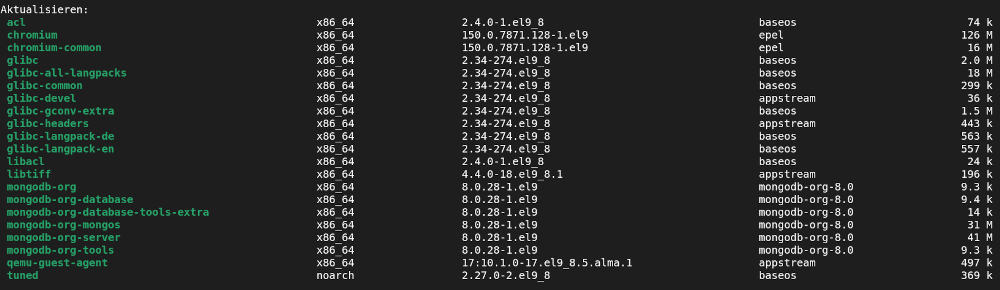
You see, that MongoDB comes from an own repository.