New MongoDB version on my computer
This morning I got updates on my AlmaLinux 9.8.
I get the updates with an Update-Script where it checks everything on the computer.
The Update script
#!/bin/bash

clear

# Variablen korrekt definieren
BOOT_FOLDER="/boot"
# df -m gibt Werte in Megabyte aus
BOOT_FOLDER_SIZE=$(df -m /boot | awk 'NR==2 {print $2}')
BOOT_FOLDER_FREE=$(df -m /boot | awk 'NR==2 {print $4}')

#connecting to the own wifi at home
echo "Connecting to the Wifi at home"

#sudo nmcli dev wifi connect 74:42:7F:9D:B9:F5

sleep 2


echo "-------------------------"

b=$(echo "${LOGNAME^}")

a=$(date +"%H")

c=$(date +"%T")

if [ "$a" -ge 6 ] && [ "$a" -lt 12 ]; then
    echo "Guten Morgen" $b "Es ist" $c
elif [ "$a" -ge 12 ] && [ "$a" -lt 18 ]; then
    echo "Guten Tag" $b "Es ist" $c
elif [ "$a" -ge 18 ] && [ "$a" -lt 20 ]; then
    echo "Guten Abend" $b "Es ist" $c
else
    echo "Gute Nacht" $b "Es ist" $c
fi
echo
echo

df -h | awk  '{print $1, $2}'


echo "------------------------"
echo

#checking whether MariaDB is active
echo "Checking the status of MariaDB"
echo

if systemctl status mariadb.service | grep -q "active (running)"; then
	echo "MariaDB läuft"
else
	echo "MariaDB läuft nicht"
fi
echo


echo "Checking the status of MongoDB"
echo

if systemctl status mongod | grep -q "active (running)"; then
	echo "MongoDB läuft"
else
	echo "MongoDB läuft nicht"
fi
echo

# Ausgabe der Größen
echo "Ordner $BOOT_FOLDER ist ${BOOT_FOLDER_SIZE}MB groß und hat noch ${BOOT_FOLDER_FREE}MB frei."

# Logik-Check: Warnung bei weniger als 150MB
if [ "$BOOT_FOLDER_FREE" -lt 150 ]; then
    echo "⚠️ Warnung: Zu wenig Platz auf /boot ($BOOT_FOLDER_FREE MB). Bitte aufräumen!"
    echo "Tipp: Nutze folgenden Befehl zum Aufräumen:"
    echo "sudo dnf remove \$(dnf repoquery --installonly --latest-limit=-2 -q)"
else
    echo "✅ Speicherplatz auf /boot ist ausreichend."
fi

#checking to updates

echo ----------------------------
echo "checking for updates for the operating system"

dnf upgrade -y --refresh

echo ----------------------------

#deleting the dnf cache
echo "Delete the dnf cache"

dnf clean packages
dnf clean metadata
dnf clean dbcache

echo -----------------------------
echo
echo "Last boots"
last -n 8
echo "---------------------------"
echo
echo "Es ist die $SHELL geladen."
echo "Loginname lautet: $LOGNAME"
echo "Zeichensatz lautet: $LANG"
echo "Bashversion: $BASH_VERSION"
echo
echo "--------------------------"

echo "Journal older than 1 day"
journalctl --vacuum-time=1d


# checking the /tmp folder size (Kann wegen systemd-tmpfiles-clean entfernt werden, aber der Check schadet nicht)
    TMP_SIZE_KB=$(du -sk /tmp/ | awk '{print $1}')
    THRESHOLD_KB=400 # 400 KB

    echo "Prüfung /tmp Ordnergröße"

    if (( TMP_SIZE_KB > THRESHOLD_KB )); then
            echo "⚠️ attention: The folder  /tmp bigger than $THRESHOLD_KB KB. current size $TMP_SIZE_KB KB"
    else
            echo "✅ The size /tmp less than $THRESHOLD_KB KB. current size $TMP_SIZE_KB KB"
    fi


    echo "---------------------------------------------"

    # DNF Cache Größe überprüfen
    ORDNER_DNF="/var/cache/dnf"
    SIZE_MB_DNF=$(du -sm "$ORDNER_DNF" | cut -f1)
    LIMIT_MB_DNF=1024 # 1 GB

    echo "Checking dnf size"
    echo "current dnf size: $(du -sh "$ORDNER_DNF" | cut -f1)"

    if [ "$SIZE_MB_DNF" -gt "$LIMIT_MB_DNF" ]; then
            echo "attention: The folder '$ORDNER_DNF' bigger than 1 GB."
    else
            echo "✅️ The folder '$ORDNER_DNF' less than 1 GB."
    fi

    echo


    echo "---------------------------------------------"

    # /var/log size checking
    ORDNER_LOG="/var/log"
    SIZE_MB_LOG=$(du -sm "$ORDNER_LOG" | cut -f1)
    LIMIT_MB_LOG=1024 # 1 GB

    echo "checking size /var/log"
    echo "current size /var/log $(du -sh "$ORDNER_LOG" | cut -f1)"

    if [ "$SIZE_MB_LOG" -gt "$LIMIT_MB_LOG" ]; then
            echo "Attention the folder '$ORDNER_LOG' bigger than 1 GB."
    else
            echo "✅ The folder '$ORDNER_LOG' less than 1 GB."
    fi
    echo

    echo "----------------------------------------------"
    echo
I start this script via Bash menu that I have written:
The shut down script
#!/bin/bash
clear

a=$(date +"%H")

c=$(date +"%T")

if [ "$a" -ge 6 ] && [ "$a" -lt 12 ]; then
    echo "Guten Morgen" $b "Es ist" $c
elif [ "$a" -ge 12 ] && [ "$a" -lt 18 ]; then
    echo "Guten Tag" $b "Es ist" $c
elif [ "$a" -ge 18 ] && [ "$a" -lt 20 ]; then
    echo "Guten Abend" $b "Es ist" $c
else
    echo "Gute Nacht" $b "Es ist" $c
fi

# Definition der PS3 (Aufforderung)
PS3="Bitte wählen Sie eine Option (1-6): "

# Liste der Einträge (synchron zur case-Anweisung)
items=("PDF Suche" "Wifi-start" "System Update" "Herunterfahren" "Startx")

select item in "${items[@]}" "Exit"
do
    case $REPLY in
        1) bash $HOME/Linux_PC/Programmieren/Bash/pdfsuche.sh;;
        2) sudo bash $HOME/Linux_PC/Programmieren/Bash/wifi_start.sh;;
        3) sudo bash $HOME/Linux_PC/Programmieren/Bash/aktu_system.sh;;
        4) bash $HOME/Linux_PC/Programmieren/Bash/herunterfahren.sh;;
        5) startx;;
        6) echo "Beende Menü..."; break;;
        *) echo "Ungültige Wahl: $REPLY";;
    esac
done
clear
You see there are other scripts that I sometimes use of regularly (in order to shut down the computer).
The shut-down script
#!/bin/bash

clear

#current date
datum=$(date --utc --date "$1" +%x)

#when the pc was turned on
einschaltuhrzeit=$(uptime -s | awk '{print $2}')

#counting the day until finish of the current year
restlichentage=$(((`date +%s`-`date -d "Dec 31 2025" +%s`+1)/86400))

echo "To the end of the year are $restlichentage days"
echo

#counting the day until finish my planned work days
echo "To my last day of work"  $(((`date +%s`-`date -d "Jul 01 2045" +%s`+1)/86400)) "days"
echo

b=$(if [ "$LOGNAME" == "sven" ]; then
    echo "Sven"
else
    # If the login name is not sven, then use the login name with big letters.
    echo "${LOGNAME^}"
fi)


# 2. Time with conditions
a=$(date +"%H")
c=$(date +"%T")

# 3. Time-dependent greeting
if [ "$a" -ge 6 ] && [ "$a" -lt 12 ]; then
    echo "Good morning" "$b" "Now it is" "$datum $c". The pc was turned on at "$einschaltuhrzeit"
elif [ "$a" -ge 12 ] && [ "$a" -lt 18 ]; then
    echo "Good day" "$b" "Now it is" "$datum $c". The pc was turned on at "$einschaltuhrzeit"
elif [ "$a" -ge 18 ] && [ "$a" -lt 20 ]; then
    echo "Good afternoon" "$b" "Now it is" "$datum $c". The pc was turned on at "$einschaltuhrzeit"
else
    echo "Good night" "$b" "Now it is" "$c"
fi


echo "---------------------------------------------------"


#moving PDF files from the home directory to the folder PDF where all PDF are saved
echo "Moving PDF's file from /home/sven to PDF/"
find . -maxdepth 1 -type f -iname '*.pdf*' -exec mv -t PDF/ {} +

#moving PDF files from the download folder to the folder PDF where all PDF are saved
echo "Moving the PDF files to the folder Downloads in /home/sven/Downloads"
echo "---------------------------------------------------"

shopt -s nullglob
pdfs_dl=( Downloads/*.pdf )
shopt -u nullglob

if [ ${#pdfs_dl[@]} -eq 0 ]; then
    echo "There are no PDF files anymore in Downloads"
else
    mv "${pdfs_dl[@]}" PDF/
    echo "The PDF files were moved to the folder PDF"
fi

#deleting all rss files in the download folder.

echo "--------------------------------------------------"
echo "Checking if there are rss files in the folder Download"
echo "--------------------------------------------------"


shopt -s nullglob
rss_dl=( Downloads/*.rss )
shopt -u nullglob

if [ ${#rss_dl[@]} -eq 0 ]; then
    echo "There are no rss files anymore"
else
    rm "${rss_dl[@]}"
    echo "The downloaded RSS files are deleted"
fi

if [ ! -f *.pdf ]; then
	echo "No PDF files in the home directory"
else
	mv *.pdf PDF/
	echo "PDF files were moved to the folder PDF"
fi

echo
echo "-------------------------------"
echo "Deleting the content in trash"
echo "-------------------------------"

#count the files in .local/share/trash/files

# Sicherer und genauer: globbing (*), wobei versteckte Dateien (mit .) ignoriert werden.
filesread=$(ls -A ~/.local/share/Trash/files/ 2>/dev/null | wc -l)
# Option: find -maxdepth 1 -type f | wc -l

echo "In the folder Trash/files are $filesread files."

echo
read -p "Do you want to delete the content of trash (y/n)? " deletetrash

# 2. Überprüfung der Benutzereingabe (Korrektur der Variablen 'action' zu 'deletetrash')
if [[ "$deletetrash" =~ ^[Yy]$ ]]; then

    # 3. Überprüfung, ob trash-cli installiert ist (Korrektur der Syntax)
    if ! command -v trash-empty &> /dev/null; then
        echo "Error: The program trash-cli is not installed. Please install it."
        exit 1
    fi

    # Leeren des Papierkorbs
    echo "Deleting the trash according to the FreeDesktop Standard..."
    trash-empty

    # 4. Überprüfung des Erfolgs des Löschvorgangs (Robustheit)
    if [ $? -eq 0 ]; then
        echo "The content in trash was successfully deleted."
    else
        echo "Error: Trash-empty failed to delete the content."
        exit 1
    fi
echo

else
    echo "Deletion aborted."
fi


echo "--------------------------------------------------"
echo "Deleting the pip cache of the python modules"
echo "--------------------------------------------------"

#deleting the pip cache.

echo "----------------------------------------------------"
echo "Deleting the pip cache"

pip cache purge

sleep 2

echo "--------------------------------------------------"
echo
echo

# if you want to reboot or shutdown the pc?
read -p "Do you want to reboot or shutdown your pc (r=reboot / s=shutdown)? (s will turn off the pc): " action

if [[ "$action" == "s" ]]; then
    echo "Initiating immediate shutdown..."
    shutdown now
    # exit 0 is optional, as shutdown terminates the system anyway.

elif [[ "$action" == "r" ]]; then
    echo "Initiating immediate reboot..."
    reboot
    # exit 0 is optional,

else
    # If the input is neither “s” nor 'r'
    echo "No shutdown or reboot command entered. Script continues."
    # The script would continue or end normally here.
fi
And we are the Updates of MongoDB.
MongoDB Updates (with others)
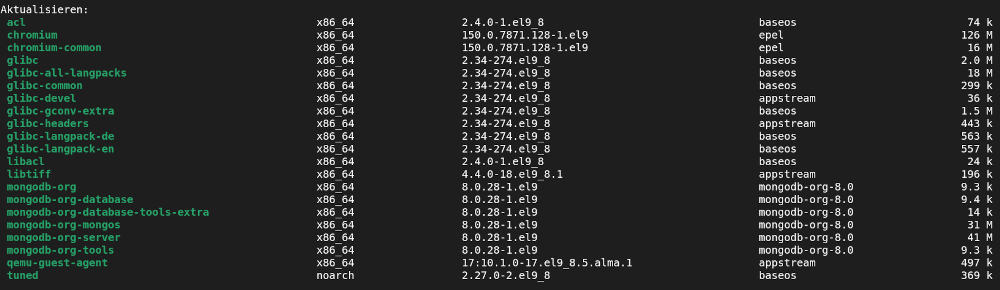
You see, that MongoDB comes from an own repository.